Tampilkan postingan dengan label Game. Tampilkan semua postingan

Sabtu, 07 Juli 2012

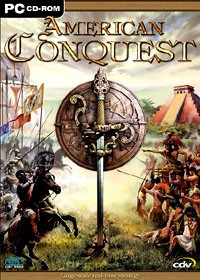
Download American Conquest : 3 Centuries Of War Full Version


Did you ever fight a battle with 16,000 infantry, cavalry, and artillery units, all supported by warship fire - at once? Imagine dozens of these conflicts, fought in thrilling campaigns spanning America's fascinating history - and you've got American Conquest. The game spans the period from 1492 (Columbus's discovery of America) up to 1813 (development of the United States and their struggles against British hegemony).

Screenshot :


Tested 100 % Work

Minimum System Requirements :

- Windows 98, 2000, ME, XP
- 1 MB Video Card
- 64 MB RAM
- 1.3 GB Hard Drive
- Pentium 2 45O MH

( Maybe Not Recommended  For Windows 7 )  

Download Here :


How To Install :

1.   Download American Conquest : 3 Centuries Of War
2.   You Will Need Power ISO or Daemon Tools To Extract It
3.   Extract American Conquest Folder From American Conquest.iso
      Using Power ISO or Daemon Tools
4.   Open Folder American Conquest 
5.   Run Setup.exe
6.   Click Next / Accept & Select Directories To Install It
7.   Wait Process Until Finish
8.   After Finish Don''t Play It
9.   Open Folder American Conquest ( The Setup Placed )
10. Open Crack ( You Will See cmd.exe )
11. Copy cmd.exe To Folder Where You Install American Conquest
12. If You See Notice Just Click Replace 

How To Play :

( If You Using Resolution 1024 x 600 Follow This Instructions )

A. For Windows XP :

1.   Right Click On Your Desktop
2.   Clcik Properties
3.   Click Setting
4.   Click Advance
5.   Click Monitor 
6.   Click Uncheck Hides Modes That This Monitor
      Cannot Display
7.   Click Ok ( You Will Go Back To Setting Menu )
8.   You Will See Screen Resolution Box ( Under Display Box )
9.   Scroll It Until Reach 1024 by 768 ( It's Minimum Resolution 
      Of American Conquest
10. Click Ok ( Your Dektop Screen Will Scroll Up & Down )
11. Run American Conquest.exe On Your Desktop
12. If You See Notice Like This
      
      Display Error
      Display mode 1024x768x8 not found. Cossacks should
      not run
      Choice :
      - Retry    - Cancel

13. Just Click Retry and Then You Will Run That Game

B. For Windows 7 :

Sorry Not Available Right Now

Note : If You Using Resolution Above 1024 x 768 Your Game Will
          Run Normal Without Change The Screen, To Restore Your
          Screen Just Follow Instruction Above This Note.

      Good Luck !!!     


Kamis, 05 Juli 2012

Download JetBoat Superchamps 2 ( Portable ) Full Version


JetBoat Superchamps 2 is the second edition of this series (JetBoat Superchamps is also available). As the previous edition in JetBoat Superchamp 2 you’ll be riding a JetBoat. This type of navigation vehicle is powered and steered by a jet of water created by a powerful turbine. Thanks to this kind of propeller you get the most maneuverability when you are accelerating because that’s the moment when the water jet is biggest. You have to complete a course as fast as you can while navigating through buoys, and taking very good care not to miss one. 

Screenshot :


Tested 100 % Work 

Minimum System Requirements :
- Windows 95, 98, ME
- 3D Video Card
- Direct X 6.1
Pentium II 233 Mhz Processor or equivalent
- 32 MB RAM
- 4 MB 3D Video Card
- 60 MB Hard Drive Space

Download Full Version Portable :

Password : zunon
JetBoat Superchamps 2 Portable

How to Play :

1. Download JetBoat Superchamps 2
2. Extract Folder JetBoat Superchamps 2
3. Open Folder JetBoat Superchamps 2
4. Run Jbs 2.exe
5. Have Fun

Sabtu, 16 Juni 2012

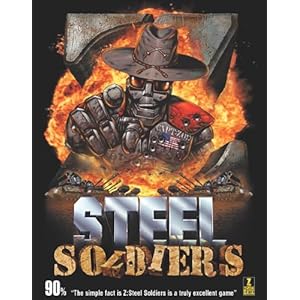
Download Z Steel Soldiers Full Version


Game Z Steel Soldiers merupakan game bergenre RTS yang digarap oleh The Bitmap Brothers. Game ini dibuat pada tahun 2000 meskipun ini termasuk Game lawas tetapi game ini memiliki Grafik yang tidak kalah bagusnya dengan Game - game yang lebih modern. Game ini berkisah tentang Perang antar bangsa Robot yang saling berebut wilayah.


Tested 100 % Work

Minimum System Requirements :

- Winsdows 95 / 98 / 98SE / ME / 2000
- Pentium 2 266 ( Pentium 3 600 and Above Recommended )
- 64 MB RAM ( At Least 128 MB Recommended )
- 8 MB Graphic / Video Card ( 32 MB Recommended )

Password : zunon

Note : Before Extract and install this game you must deactived Antivirus
For Windows 7 : Click This

Download :


File :


How to Join :

1. Extract Hj Split
2. Open folder Hj Split
3. Open hjsplit.exe
4. Click Join
5. Find Z Steel Soldiers Part 1 ( All part must in 1 Folder )
6. Click Start
7. Wait until Process Finish
8. After the file joined it will be ( Z Steel Soldiers.rar )

How to Install

1. Extract folder Z Steel Soldiers in Z Steel Soldiers.rar
2. Open folder Z Steel Soldiers 
3. Open Setup.bat
4. Wait until Process Finish
5. After Process Finish Open Folder Bin
6. Open z2.exe
7. Try to Play

Semoga Berhasil !!!
Related Posts Plugin for WordPress, Blogger...